System Design: Start Beginner
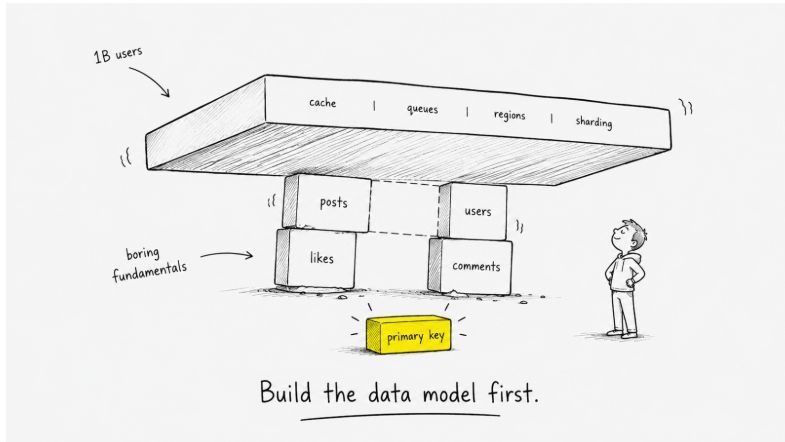
Did you ever think about how a system handles 1 million users? Most engineers jump straight to "design Twitter for 1B users" before understanding what a primary key is. That's the wrong starting point.
TL;DR, if you're in a hurry:
- Learn LLD (schemas, APIs, data relationships) before HLD (sharding, caching, queues)
- Estimation is a skill: load, storage, and resource numbers should come quickly
- Stateless servers + a shared cache layer (Redis) is the foundation of scalable architecture
Start with Low-Level Design
LLD asks: how exactly does this work?
Schemas, API contracts, error handling, data relationships, what happens when input is wrong. The boring 90% of real engineering. Before you think about sharding a database, you should know what you're sharding and why.
Then, only after that, move to High-Level Design: how do the big pieces fit together? Sharding, caching, queues, regions. These tools only make sense when you understand what's actually being sharded, cached, or queued.
Then learn the trade-offs. CAP theorem, latency vs cost, consistency vs availability. They become useful when you have something concrete to apply them to, not as abstract vocabulary.
A lot of engineers can draw a Twitter timeline diagram. Ask them to design the schema for posts, likes, comments, and reactions. They freeze.
HLD without LLD is fan fiction. Build the data model first. Earn the architecture diagram.
Estimation: The Numbers You Need Fast
In an interview, or in production planning, you need to estimate servers, storage, and throughput quickly. The trick is using powers of 2 as a mental shortcut:
| Power of 2 | Approx Decimal | Common Name |
|---|---|---|
| 2^10 | ~1 thousand | KB |
| 2^20 | ~1 million | MB |
| 2^30 | ~1 billion | GB |
| 2^40 | ~1 trillion | TB |
Load Estimation
Start from DAU (Daily Active Users), then calculate reads and writes.
Assume 100M DAU. Each user posts 10 things per day:
Writes = 100M users × 10 posts = 1B posts/day
Each user reads 1,000 posts per day (doomscrolling):
Reads = 100M users × 1,000 posts = 100B reads/day
The read/write ratio here is 100:1. That asymmetry shapes every architecture decision downstream: caching strategy, database replication, CDN usage.
Storage Estimation
Suppose your app has two content types: text posts (200 chars) and photo posts. Only 10% of posts contain photos.
1 text post  = 200 chars × 2 bytes = 400 bytes ≈ 500 bytes
1 photo post = ~2 MB

Text storage  = 500 bytes × 1B posts       = 0.5 TB/day
Photo storage = 2 MB × 100M photo posts    = 200 TB/day

Total ≈ 200.5 TB/day
Photos dominate. This tells you where to spend your storage budget and why a CDN for images isn't optional.
Resource Estimation
Given 10,000 requests/second, each taking 10ms of CPU time:
Step 1: Total CPU time = 10,000 req/s × 10ms = 100,000 ms/s
Step 2: One CPU core provides 1,000 ms/s
Step 3: Cores needed = 100,000 / 1,000 = 100 cores
Step 4: At 4 cores/server → 100 / 4 = 25 servers minimum
25 servers, sitting behind a load balancer. Which brings us to scaling.
Latency vs Throughput
Two words you'll hear constantly. They're not synonyms.
Latency is speed: the time to complete a single request. Usually measured in milliseconds. Low latency means the app feels fast. High latency means it doesn't. Round Trip Time (RTT) is the latency for a request to travel to the server and back.
Throughput is capacity: how many requests the system handles per unit of time. Measured in RPS (requests per second), TPS, or QPS. Every server has a ceiling. Throughput tells you where that ceiling is.
The ideal case is obvious: high throughput and low latency. The realistic case is a trade-off. Optimizing for one often costs the other: a design that batches requests to maximize throughput adds latency to each individual request.
Know which one your system actually cares about before you start optimizing.
Scaling: Up or Out?
When a server hits 100% CPU capacity, you have two options.
Vertical Scaling (Scale Up)
Make the existing machine bigger: more RAM, more CPU, more storage. In the cloud, this means upgrading instance types (e.g., t2.micro → x1.32xlarge).
Pro: Simple. No code changes required.
Cons:
- Hard physical limit: you can't buy a server with infinite cores
- Single point of failure: if the one "super server" goes down, everything goes down
- Exponential cost: high-end hardware is disproportionately expensive per unit of compute
Horizontal Scaling (Scale Out)
Add more machines to the pool instead of upgrading the existing one. This is what most real-world systems do.
Pros:
- Theoretically infinite scale: keep adding servers
- Redundancy: if one server dies, the others absorb the traffic
Con: Complexity. A lot of it.
The complexity isn't optional: it's the price of resilience. Horizontal scaling is what makes a service stay up when a machine fails at 3am.
The Load Balancer
When you have multiple servers, clients can't be given a list of IP addresses and left to decide. You need a traffic cop in between.
A Load Balancer (LB) sits in front of your servers. All requests hit the LB, which routes them across the fleet. Three common routing strategies:
- Round Robin: distribute in order (Server A → B → A → B). Simple, predictable.
- Least Connection: send traffic to whichever server is currently doing the least work. Better for uneven request sizes.
- IP Hash: hash the user's IP so they always route to the same server. Useful when server-local cache matters.
Layer 4 vs Layer 7
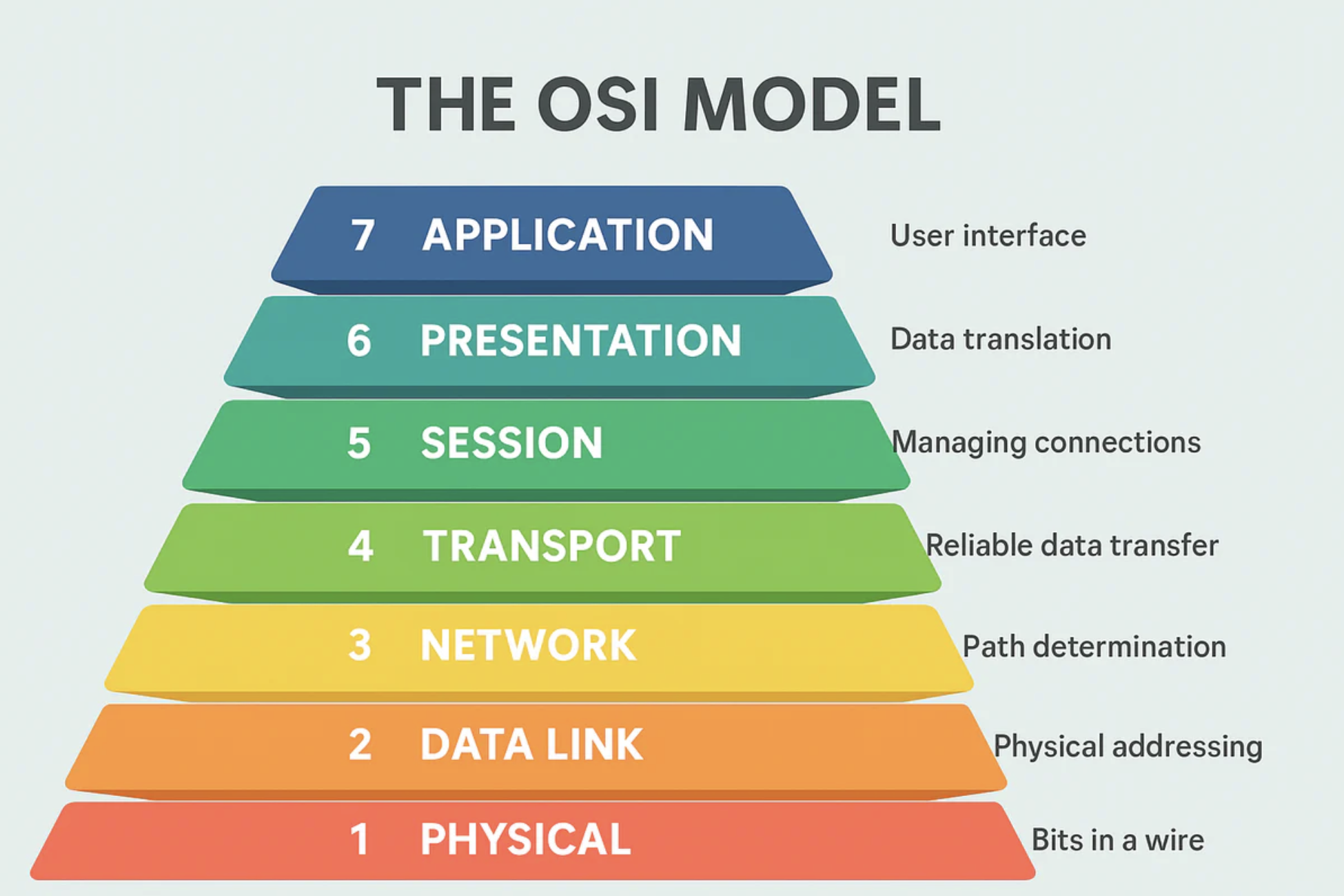
Where you place the LB in the OSI model changes what it can do.
Layer 4 (The "Dumb" Router)
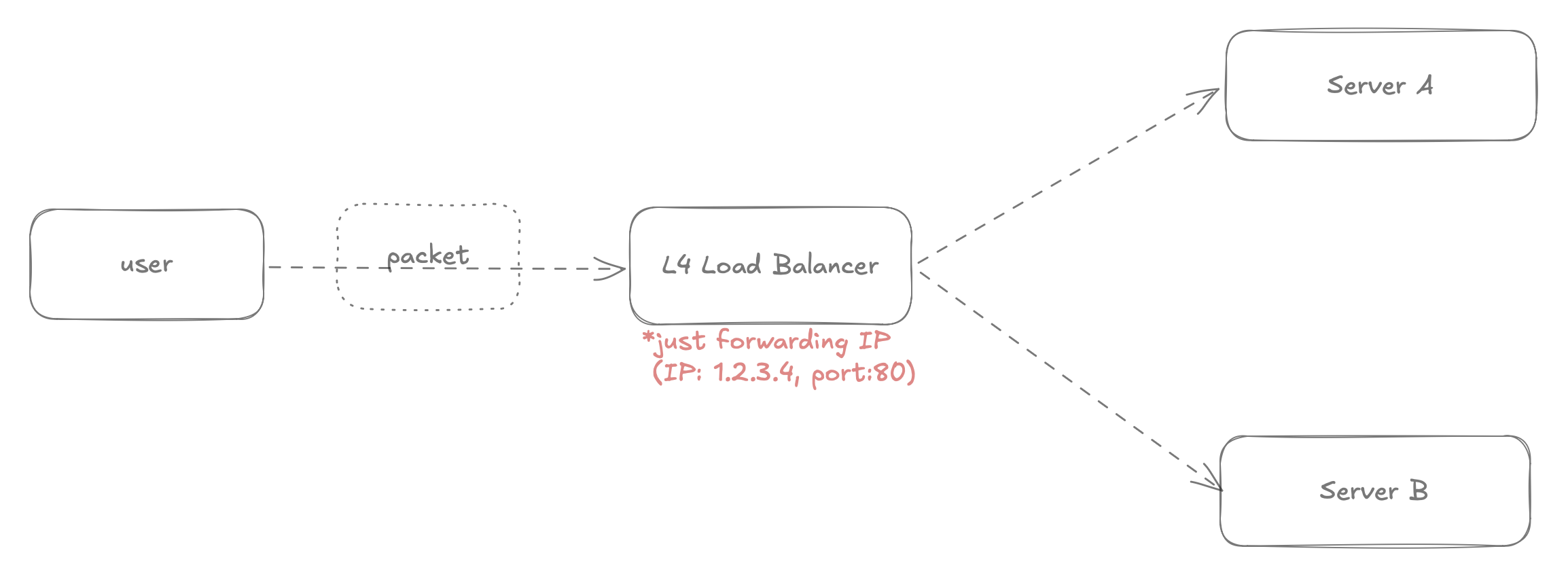
Operates at the transport layer: sees IP address and port, nothing else.
Logic: Traffic from 1.2.3.4 → forward to Server A
Fast. Handles massive throughput. But it's blind to content: it can't distinguish a video stream from an API call.
Layer 7 (The "Smart" Router)
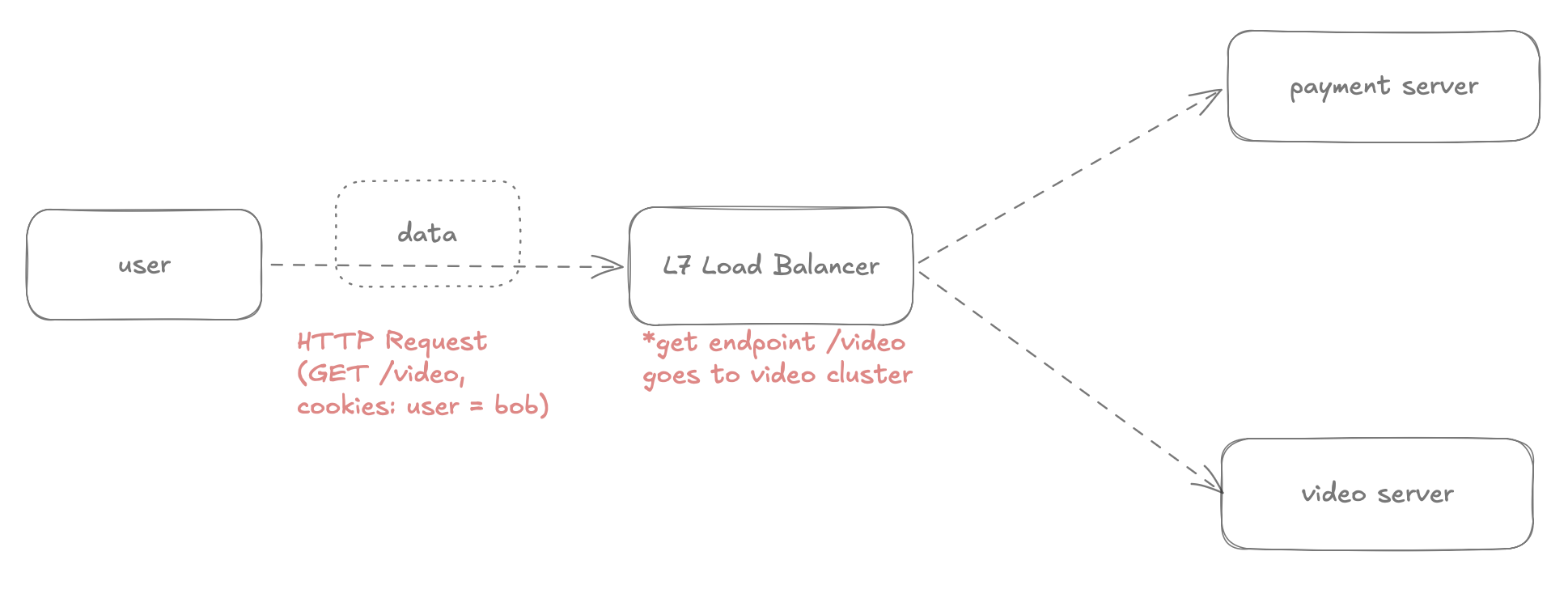
Operates at the application layer: reads HTTP headers, URLs, cookies.
/video/stream → route to video server cluster
/checkout     → route to payment server cluster
Enables smart routing for microservices. The cost: slightly slower, because it has to decrypt and inspect the packet.
For most modern applications, Layer 7 is the right choice. The flexibility is worth the small latency overhead.
The "State" Problem
Horizontal scaling introduces a hard problem: server memory is local.
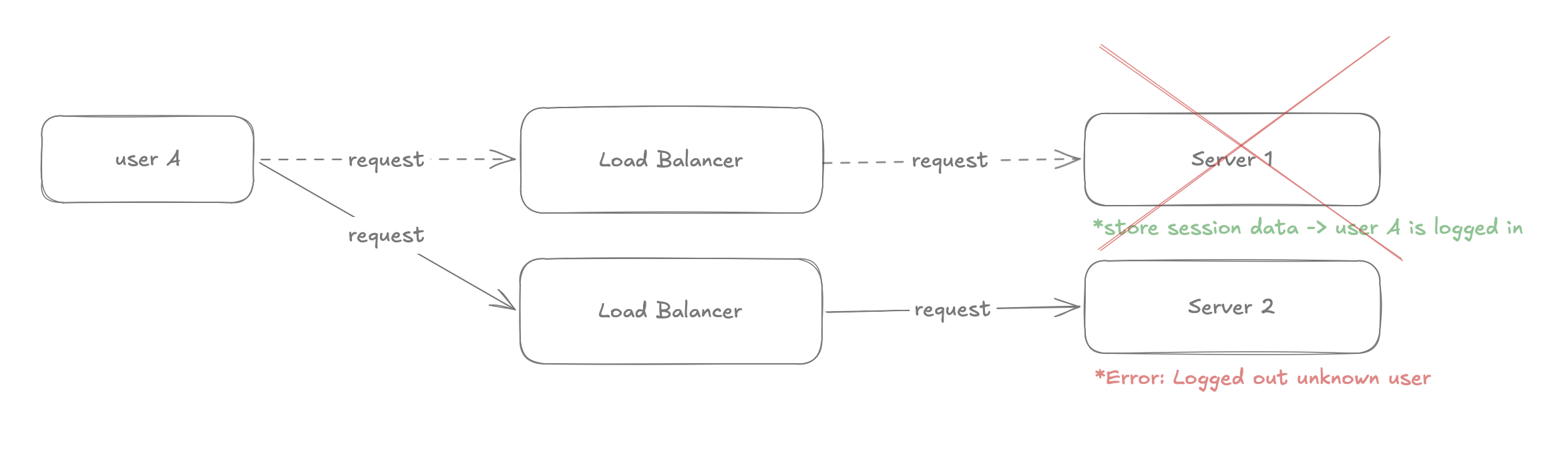
User A logs in and hits Server 1. Their session, is_logged_in = true, is stored in Server 1's RAM. Their next request routes to Server 2. Server 2 has no idea who they are. The user gets logged out.
Stateful Architecture (The Trap)
The server remembers the client's data from previous requests, locally.
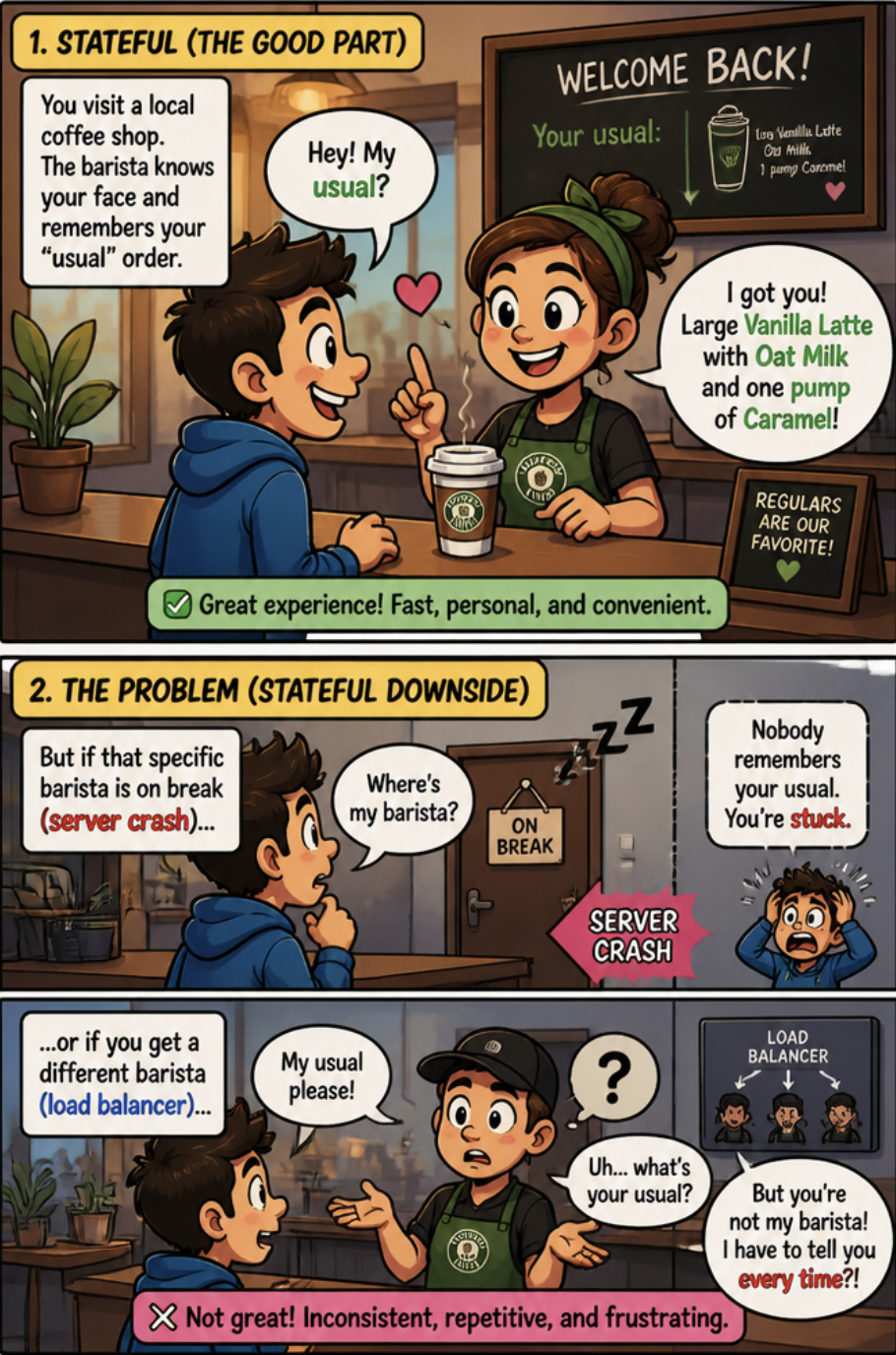
You might reach for sticky sessions (forcing a user to always hit Server A), but this makes auto-scaling impossible. If Server A dies, User A loses everything.
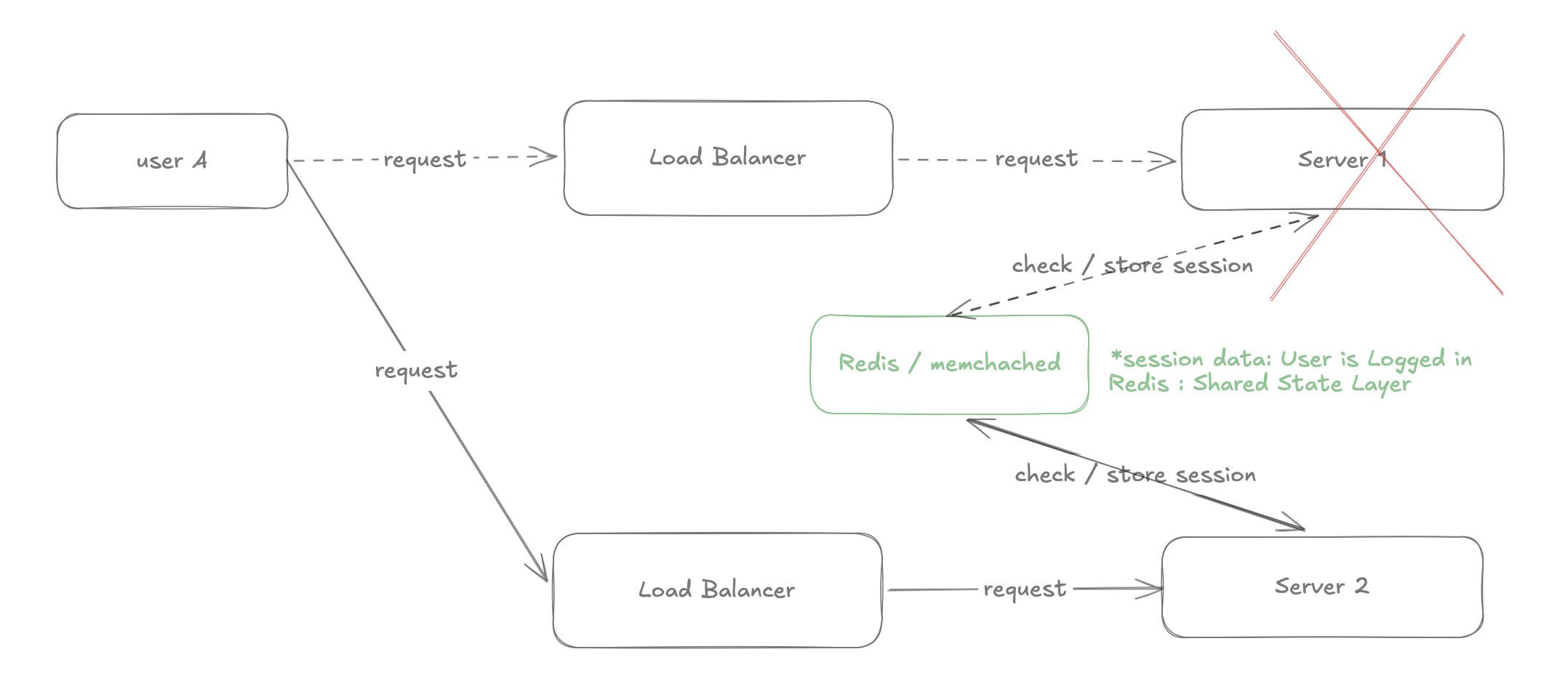
Stateless Architecture (The Solution)
The server keeps zero information about a user in its own memory. Every request carries enough information to be handled independently, like handing a barista a ticket with your order written on it. It doesn't matter which barista serves you; the state travels with the request.
How to implement it:
- Move session data out of the web server's memory
- Store it in a shared state layer: typically a fast in-memory cache like Redis or Memcached
- Any server that receives a request can validate the session by checking Redis
Request → Server 1 → check Redis → session valid → respond
         (Server 1 dies)
Request → Server 2 → check Redis → session still valid → respond
The key mindset shift: treat your web servers like cattle, not pets. Kill any server, replace it instantly, lose zero user data. The "state" lives in Redis, not in the server.
Proxies: Forward vs Reverse
Two more terms that sound similar and mean opposite things.
Forward Proxy (Client-Side)
Acts on behalf of the client. The server doesn't know who the real client is: the proxy masks the origin IP. This is what a VPN does: your traffic goes through the proxy before hitting the internet.
Key trait: IP masking. The server sees the proxy, not you.
Reverse Proxy (Server-Side)
Acts on behalf of the server. The client doesn't know which backend server it's actually talking to. The LB described above is a reverse proxy.
Key traits:
- Security: hides backend server IP addresses from the internet
- SSL Termination: encrypting and decrypting HTTPS is expensive; a dedicated reverse proxy handles it so backend servers don't have to
- Caching: can serve cached responses without hitting origin servers at all
A complete minimal architecture now looks like this:
Internet → Reverse Proxy (SSL termination)
         → Layer 7 Load Balancer
         → Stateless App Servers (any can die)
         → Redis (shared session state)
         → Database
What Comes Next
This framework (LLD first, estimation, stateless servers, load balancing, shared state) covers the foundation. Everything else (sharding, CDNs, message queues, distributed databases) is built on top of these concepts.
The CAP theorem only makes sense once you have a real system to apply it to. Caching strategies only matter once you've measured where your latency actually comes from. Start here, get this working, then graduate to the next layer.
The question I'd leave you with: which part of this would break first in your current production system?
Click to show love
Discussion
Configure NEXT_PUBLIC_GISCUS_* environment variables to enable comments.