What Vision's Built-in Classifier Actually Gives You, and Where It Breaks
What Vision's Built-in Classifier Actually Gives You, and Where It Breaks
Apple's Vision framework ships a general-purpose image classifier for free: no training, no .mlmodel to bundle, no dataset to collect. The catch: it was never trained to answer your question. It was trained to answer a question, and your job is bridging the gap.
TL;DR, if you're in a hurry:
VNClassifyImageRequestwraps a fixed, on-device model covering 1,303 generic categories: you can't retrain it, only read its output- Its labels rarely match your domain vocabulary, so you need a mapping layer between "what Vision says" and "what your app needs"
- Taking the single top-confidence label is often wrong: the fix is scanning the top-N candidates for the first one your domain actually cares about
Pillow, denim, upholstery: not quite what I needed
I'm building an AR app (SonAR) that simulates how an ultrasonic sensor reads its environment, a robotics teaching tool where a virtual sensor "shoots" a wave at a surface and reports back whether it echoes. Real ultrasonic sensors behave differently depending on what they hit: a wall reflects cleanly, a couch cushion swallows the signal. To simulate that convincingly, the app needs to guess, from the camera feed, whether the thing in front of it is hard or soft.
My first instinct was to reach for VNClassifyImageRequest and call it done. It's built into Vision, runs on-device, needs zero setup. I ran it, printed the top result, and got back labels like "pillow", "denim", "upholstery": recognizable, but not the binary signal my physics simulation actually needed.
Vision's actual vocabulary
The model behind VNClassifyImageRequest isn't a mystery box: Apple exposes its full label vocabulary through VNClassifyImageRequest.knownClassifications(forRevision:). Revision 1 covers 1,303 identifiers: everyday objects, materials, scenes, activities. It's a broad, general-purpose taxonomy, not a domain-specific one: there's no "soft" or "hard" label waiting for you. There's "pillow", "couch", "granite", "drywall": specific nouns you're expected to interpret yourself.
That reframed the task. I wasn't picking a better classifier. I was writing the interpretation layer Apple deliberately left out: a mapping from specific noun to the property my simulation actually cares about.
The pipeline, stage by stage
Before the mapping layer, it's worth being precise about where Vision's job ends and mine begins. The pipeline has four distinct stages, and only the first two belong to Apple.
1. Capture: a single camera frame comes in as a CVPixelBuffer, pulled straight from the AR session's current frame. Nothing Vision-specific has happened yet; this is just pixels.
2. Detection (the request): the pixel buffer gets wrapped in a VNImageRequestHandler and handed a VNClassifyImageRequest to run. This is where the actual on-device model executes: Core ML under the hood, accelerated by the Neural Engine, running inference against all 1,303 known labels at once.
// Services/MaterialDetection/MaterialVisionClassifier.swift, the detection step: hand one frame to Vision
let request = VNClassifyImageRequest()
let handler = VNImageRequestHandler(cvPixelBuffer: pixelBuffer, orientation: .right)
guard (try? handler.perform([request])) != nil,
      let observations = request.results else { return nil }
3. Classify (Vision's output): perform populates request.results with an array of VNClassificationObservation, each one just an identifier: String and a confidence: Float between 0 and 1, pre-sorted descending by confidence. This array is the entirety of what Vision hands back. It is not "soft," it is not "hard": it's ranked evidence, nothing more. Everything past this line is my code, not Apple's model.
4. Output (app interpretation): pickBestMatch walks that evidence and turns it into a verdict my simulation can act on: a MaterialClassificationResult with a .soft / .hard category and the confidence that earned it. This is the stage covered in the tree below: it's the only stage where a "decision" actually happens.
Stages 1–3 are the same for every Vision-based feature you'll ever build, regardless of domain. Stage 4 is the part nobody hands you: it's specific to what your app needs the answer for.
The pattern: rank, then filter for relevance
The naive approach (just take observations[0], the single highest-confidence label) fails more often than it should. Vision's top guess is sometimes a scene-level label ("room", "indoors") or something adjacent but useless ("pattern", "texture") that outranks the specific, actionable label sitting a few slots down.
The fix: don't trust rank 1 blindly. Scan the top-N candidates in order, and return the first one that actually maps to a category your app can act on.
// MaterialClassifier.swift: pick the first Vision candidate that maps to a usable category
private static let topNCandidates = 5

private func pickBestMatch(from observations: [VNClassificationObservation]) -> MaterialClassificationResult {
    for candidate in observations.prefix(Self.topNCandidates) {
        let result = mapToCategory(label: candidate.identifier, confidence: candidate.confidence)
        if result.category == .soft || result.category == .hard {
            return result
        }
    }
    let top = observations[0]
    return mapToCategory(label: top.identifier, confidence: top.confidence)
}
Three things worth noticing here, in order:
observations.prefix(Self.topNCandidates): Vision returns candidates pre-sorted by confidence, so prefix(5) is "give me the model's five best guesses," not an arbitrary slice. Five is a tuning knob, not a magic number: small enough that low-confidence noise doesn't leak in, large enough that a useful label buried at rank 3 or 4 still gets a chance.
The early return inside the loop: this is the actual fix. The function doesn't ask "what's Vision's best guess?" It asks "what's Vision's best guess that my app can do something with?" Those are different questions, and conflating them is the bug I started with.
The fallback after the loop: if none of the top 5 candidates map to .soft or .hard, the function doesn't return nil and leave the caller guessing. It falls back to whatever rank 1 was, mapped through the same function (which presumably returns some .unknown or neutral category). A missing signal is still a signal: silently returning nothing would push the ambiguity downstream to whoever calls this, which is worse.
A real bug: when "structure" beats "sofa"
The pattern above isn't hypothetical: it's the fix for a bug I actually hit. Pointed the camera at a real soft object (a couch), expected .soft, got .unknown back instead. The debug print in mapToCategory showed why: labelValue = "structure", confidenceValue = 0.26867107: comfortably past the 0.2 threshold, but "structure" isn't in the soft list or the hard list in MaterialLookupLoader.swift. It fell straight through to the last branch.
My first assumption was a coverage gap: just add "structure" to the soft list and move on. Before doing that, I checked what "structure" actually is in Vision's real taxonomy (pulled via supportedIdentifiers() on iOS 15+, or VNClassifyImageRequest.knownClassifications(forRevision:) below that). Turns out "structure" is a real label, but a generic architectural one: the kind of catch-all bucket Vision reaches for on anything structural or built, soft or not. Adding it to the soft list would've been the wrong fix: it shows up for hard, architectural objects too, so I'd have traded one misclassification for a worse one in the other direction.
That sent me through the actual list, label by label, instead of guessing:
- Already correct in the soft list:
pillow,sofa,curtain,hoodie,clothing,textile,stuffed_animals; these are real Vision identifiers, correctly mapped. - Missing, but real: Vision's taxonomy has these, and none of them were in the list:
bathrobe,bedding,cloak,leotard,mitten,poncho,swimsuit,wetsuit,material(a generic one). - Dead weight:
fabric,cloth,cushion,blanket,carpet,rug,fur,wool,cotton,leatherwere sitting in the soft list but don't exist anywhere in Vision's actual identifier set. Vision names objects ("pillow","sofa"), not the material they're made of ("cotton","fabric"), so these entries could never match anything, ever. Pure noise, safe to delete.
So the real bug wasn't a missing label at all: it was that Vision's top-1 guess for a real sofa landed on "structure", a generic bucket, before it landed on anything specific enough to classify. "structure" beat "sofa" on confidence. That's the exact failure mode pickBestMatch exists to catch: not "Vision doesn't know this material," but "Vision's best guess is real, just not useful, and a more useful guess is sitting a few ranks down."
Here's a real capture, camera pointed at a sofa (Services/MaterialDetection/MaterialVisionClassifier.swift, debug output rounded):
| Rank | identifier | confidence | mapToCategory result |
|---|---|---|---|
| 1 | "structure" | 0.35 | .unknown: generic, not in either list |
| 2 | "furniture" | 0.30 | .unknown: generic, not in either list |
| 3 | "sofa" | 0.28 | .soft: match, loop stops here |
| 4 | "wall" | 0.10 | (never evaluated) |
| 5 | "room" | 0.08 | (never evaluated) |
pickBestMatch walks rank 1, then rank 2, both .unknown, then hits rank 3 ("sofa", which is in the soft list) and returns immediately: category: .soft, topLabel: "sofa", confidence: 0.28. Ranks 4 and 5 never get checked at all; the loop already found its match. Notice the final answer's confidence (0.28) is lower than the labels that lost (0.35, 0.30): rank alone was never the right thing to optimize for. If none of the top 5 had matched, the fallback kicks in and returns rank 1 mapped through mapToCategory: .unknown, same as the old top-1-only behavior. The fix doesn't invent a better guess; it just refuses to give up after the first one.
Here's the same flow drawn out, using the real sequence above:
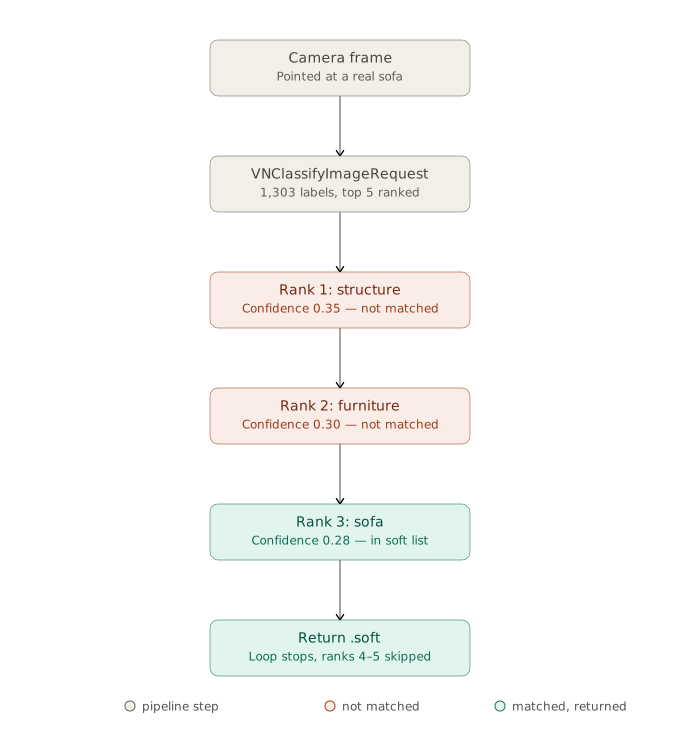
If none of the top 5 candidates had matched, the same loop falls back to rank 1 mapped through mapToCategory: .unknown, same as the old top-1-only behavior.
The diagram makes the earlier point concrete, with real data this time: Vision never decided "soft"; it decided "structure" was the most likely label, full stop. mapToCategory and pickBestMatch are the only place a soft/hard verdict gets made, and they got there by walking past two correct-but-useless answers to reach a correct-and-useful one.
What a heuristic can't claim
This whole approach is a visual heuristic, not a measurement. pickBestMatch is answering "what does this surface look like?", and appearance is a proxy for the thing the simulation actually needs, which is acoustic absorption. A tightly-woven canvas bag and a foam cushion can look similar to a classifier trained on everyday photos, but behave completely differently against a real ultrasonic pulse.
I don't think that's a reason to avoid this pattern: it's a reason to be honest about what it's doing in the UI copy and the code comments around it. "This looks like a soft surface" is a defensible claim. "This surface absorbs sound" is not, not from a single RGB frame. The gap between those two sentences is exactly the gap between a classifier and a sensor.
The other tradeoff is coverage, and the "structure" bug taught me its exact shape: Vision names objects ("pillow", "sofa", "bathrobe"), not the materials they're made of ("cotton", "fabric", "leather"). Half my original soft list was entries like that: words that felt right to a human but don't exist anywhere in Vision's 1,303-identifier vocabulary, so they could never match. That's a gap in my mapping table, not a limitation I can retrain away, and no amount of topNCandidates tuning fixes a lookup table with dead entries in it. The honest long-term fix, if blind spots like this start to matter more than they do today, is a small Create ML model trained on my own labeled examples instead of interpreting someone else's object-shaped taxonomy. pickBestMatch is the right amount of engineering for a heuristic signal; it stops being enough the moment the product needs to make a stronger claim than "looks like."
Where's the line between "good enough heuristic" and "needs an actual model"? I don't think it's a fixed rule: it's whatever confidence the UI is willing to claim out loud.
Click to show love
Discussion
Configure NEXT_PUBLIC_GISCUS_* environment variables to enable comments.